# Media information

Although OpenTravel allows unlimited occurrences of each element within the OTA\_HotelDescriptiveContentNotifRQ message, ENTERPRISE CONNECTIVITY has elected to set limits for many of these elements. Unless specified under the Usage column below, ENTERPRISE CONNECTIVITY only allows one instance of each element per property message.

| **Element**       | **Level**   | **Attribute**        | <p><strong>R</strong></p><p><strong>O</strong></p><p><strong>C</strong></p> | <p><strong>G D</strong></p><p><strong>S</strong></p> | **Exampl e**          | **Usage**                                                                                     | **Description**                                                                                                                                                                                                                |
| ----------------- | ----------- | -------------------- | --------------------------------------------------------------------------- | ---------------------------------------------------- | --------------------- | --------------------------------------------------------------------------------------------- | ------------------------------------------------------------------------------------------------------------------------------------------------------------------------------------------------------------------------------ |
| MultimediaObjects | 3           | <p><br></p>          | O                                                                           | <p><br></p>                                          | <p><br></p>           | <p><br></p>                                                                                   | Only 1 element allowed per Property message.                                                                                                                                                                                   |
| MultimediaObject  | 4           | <p><br></p>          | R                                                                           | <p><br></p>                                          | <p><br></p>           | <p><br></p>                                                                                   | <p><br></p>                                                                                                                                                                                                                    |
| <p><br></p>       | <p><br></p> | ParagraphNum ber     | R                                                                           | <p><br></p>                                          | 3                     | <p><br></p>                                                                                   | <p>This will represent the order of the images in ascending order by number beginning with</p><p>1.</p><p><br></p><p>The number <strong>1</strong> will equate to the first picture (link) that is pulled for displayed.</p>   |
| <p><br></p>       | <p><br></p> | Removal              | O                                                                           | <p><br></p>                                          | <p><br></p>           | true false                                                                                    | <p><br></p>                                                                                                                                                                                                                    |
| <p><br></p>       | <p><br></p> | ContentData          | R                                                                           | <p><br></p>                                          | <p><br></p>           | A                                                                                             | <p>The type of content the supplier will provide.</p><p><br></p><p>Only ContentData =“<strong>A</strong>” will be allowed.</p>                                                                                                 |
| <p><br></p>       | <p><br></p> | Description          | O                                                                           | <p><br></p>                                          | <p><br></p>           | 310 Char                                                                                      | Image Description                                                                                                                                                                                                              |
| <p><br></p>       | <p><br></p> | PictureCategory Code | R                                                                           | <p><br></p>                                          | <p><br></p>           | <p>Refer to the “HCD OTA</p><p>Supported Codes” spreadshe</p><p>et  for</p><p>valid codes</p> | <p>Picture Category Code</p><p>(PIC).</p><p><br></p><p>Same Picture Category Code can be submitted with a new ContentID and/or</p><p>Paragraphnumber attribute.</p>                                                            |
| <p><br></p>       | <p><br></p> | ContentCaption       | R                                                                           | <p><br></p>                                          | This is a great pool. | <p>50 Char</p><p><br></p><p>Max: 100 bytes</p>                                                | Image Caption Text                                                                                                                                                                                                             |
| <p><br></p>       | <p><br></p> | FileName             | R                                                                           | <p><br></p>                                          | Poolfro nt.jpeg       | 64 Char                                                                                       | Name of image file that contains corresponding image.                                                                                                                                                                          |
| <p><br></p>       | <p><br></p> | ContentID            | R                                                                           | <p><br></p>                                          | Pool00 1              | 64 Char                                                                                       | <p>Unique Indicator to tie back to the Property data.</p><p><br></p><p>This ID should match an ID that was provided within the property data or to link at property level, include the brand and property ID, eg. XX12345.</p> |

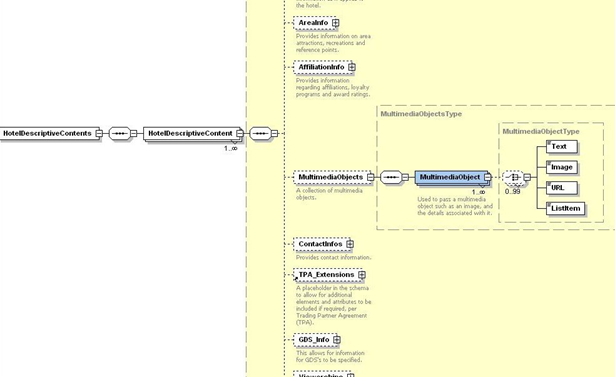
**Schema design view**

<figure><img src="/files/I2VHYASktgNRu9X1imGi" alt=""><figcaption></figcaption></figure>

**Example transaction**

```xml
<OTA_HotelDescriptiveContentNotifRQ xmlns="
http://www.opentravel.org/OTA/2003/05
" xmlns:xsi="
http://www.w3.org/2001/XMLSchema-instance
" Version="4.000"
PrimaryLangID="EN">
<HotelDescriptiveContents>
<HotelDescriptiveContent UnitofMeasureCode="1" CurrencyCode="USD"
TimeZone="CST" BrandCode="ZZ" HotelCode="AA123" HotelName="Test Hotel" Overwrite="false">
<MultimediaObjects>
<MultimediaObject Paragraphnumber="1" Removal="false"
ContentData="A" Description="Front view of hotel" PictureCategoryCode="1"
ContentCaption="Exterior of Hotel" FileName="ext01.jpg"
ContentId="exterior01">
<MultimediaObject Paragraphnumber="2" Removal="false"
ContentData="A" Description="Outdoor pool open May through Sept yearly"
PictureCategoryCode="3" ContentCaption="Outdoor Pool" FileName="pool01.jpg"
ContentId="Pool01">
<MultimediaObject Paragraphnumber="3" Removal="false"
ContentData="A" PictureCategoryCode="6" ContentCaption="Standard King Bed
Room" FileName="stdkng.jpg" ContentId="stdking">
<MultimediaObject Paragraphnumber="4" Removal="false"
ContentData="A" PictureCategoryCode="6" ContentCaption="Junior Suite"
FileName="jrsuite.jpg" ContentId="jrste">
</MultimediaObjects>
</HotelDescriptiveContent>
</HotelDescriptiveContents>
</OTA_HotelDescriptiveContentNotifRQ>
```


---

# Agent Instructions: Querying This Documentation

If you need additional information that is not directly available in this page, you can query the documentation dynamically by asking a question.

Perform an HTTP GET request on the current page URL with the `ask` query parameter:

```
GET https://developer.rategain.com/content/content-update-1/transaction-specifications/media-information.md?ask=<question>
```

The question should be specific, self-contained, and written in natural language.
The response will contain a direct answer to the question and relevant excerpts and sources from the documentation.

Use this mechanism when the answer is not explicitly present in the current page, you need clarification or additional context, or you want to retrieve related documentation sections.