> For the complete documentation index, see [llms.txt](https://developer.rategain.com/llms.txt). Markdown versions of documentation pages are available by appending `.md` to page URLs; this page is available as [Markdown](https://developer.rategain.com/content/content-update-1/transaction-specifications/media-information.md).

# Media information

Although OpenTravel allows unlimited occurrences of each element within the OTA\_HotelDescriptiveContentNotifRQ message, ENTERPRISE CONNECTIVITY has elected to set limits for many of these elements. Unless specified under the Usage column below, ENTERPRISE CONNECTIVITY only allows one instance of each element per property message.

| **Element**       | **Level**   | **Attribute**        | <p><strong>R</strong></p><p><strong>O</strong></p><p><strong>C</strong></p> | <p><strong>G D</strong></p><p><strong>S</strong></p> | **Exampl e**          | **Usage**                                                                                     | **Description**                                                                                                                                                                                                                |
| ----------------- | ----------- | -------------------- | --------------------------------------------------------------------------- | ---------------------------------------------------- | --------------------- | --------------------------------------------------------------------------------------------- | ------------------------------------------------------------------------------------------------------------------------------------------------------------------------------------------------------------------------------ |
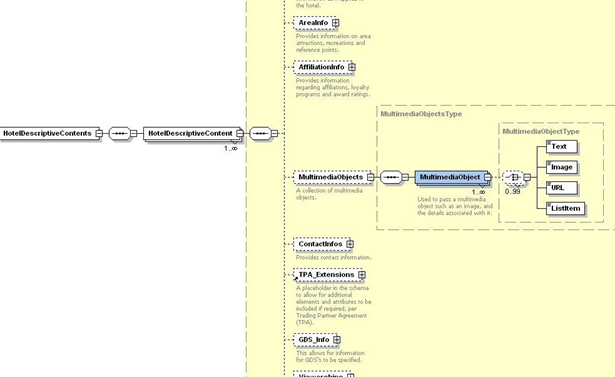
| MultimediaObjects | 3           | <p><br></p>          | O                                                                           | <p><br></p>                                          | <p><br></p>           | <p><br></p>                                                                                   | Only 1 element allowed per Property message.                                                                                                                                                                                   |
| MultimediaObject  | 4           | <p><br></p>          | R                                                                           | <p><br></p>                                          | <p><br></p>           | <p><br></p>                                                                                   | <p><br></p>                                                                                                                                                                                                                    |
| <p><br></p>       | <p><br></p> | ParagraphNum ber     | R                                                                           | <p><br></p>                                          | 3                     | <p><br></p>                                                                                   | <p>This will represent the order of the images in ascending order by number beginning with</p><p>1.</p><p><br></p><p>The number <strong>1</strong> will equate to the first picture (link) that is pulled for displayed.</p>   |
| <p><br></p>       | <p><br></p> | Removal              | O                                                                           | <p><br></p>                                          | <p><br></p>           | true false                                                                                    | <p><br></p>                                                                                                                                                                                                                    |
| <p><br></p>       | <p><br></p> | ContentData          | R                                                                           | <p><br></p>                                          | <p><br></p>           | A                                                                                             | <p>The type of content the supplier will provide.</p><p><br></p><p>Only ContentData =“<strong>A</strong>” will be allowed.</p>                                                                                                 |
| <p><br></p>       | <p><br></p> | Description          | O                                                                           | <p><br></p>                                          | <p><br></p>           | 310 Char                                                                                      | Image Description                                                                                                                                                                                                              |
| <p><br></p>       | <p><br></p> | PictureCategory Code | R                                                                           | <p><br></p>                                          | <p><br></p>           | <p>Refer to the “HCD OTA</p><p>Supported Codes” spreadshe</p><p>et  for</p><p>valid codes</p> | <p>Picture Category Code</p><p>(PIC).</p><p><br></p><p>Same Picture Category Code can be submitted with a new ContentID and/or</p><p>Paragraphnumber attribute.</p>                                                            |
| <p><br></p>       | <p><br></p> | ContentCaption       | R                                                                           | <p><br></p>                                          | This is a great pool. | <p>50 Char</p><p><br></p><p>Max: 100 bytes</p>                                                | Image Caption Text                                                                                                                                                                                                             |
| <p><br></p>       | <p><br></p> | FileName             | R                                                                           | <p><br></p>                                          | Poolfro nt.jpeg       | 64 Char                                                                                       | Name of image file that contains corresponding image.                                                                                                                                                                          |
| <p><br></p>       | <p><br></p> | ContentID            | R                                                                           | <p><br></p>                                          | Pool00 1              | 64 Char                                                                                       | <p>Unique Indicator to tie back to the Property data.</p><p><br></p><p>This ID should match an ID that was provided within the property data or to link at property level, include the brand and property ID, eg. XX12345.</p> |

**Schema design view**

<figure><img src="https://3945324883-files.gitbook.io/~/files/v0/b/gitbook-x-prod.appspot.com/o/spaces%2Fp4y5dHVBc6vTCuYBLiHH%2Fuploads%2FWTsc7obtGsuLP4gdCH1F%2F413604109.png?alt=media" alt=""><figcaption></figcaption></figure>

**Example transaction**

```xml
<OTA_HotelDescriptiveContentNotifRQ xmlns="
http://www.opentravel.org/OTA/2003/05
" xmlns:xsi="
http://www.w3.org/2001/XMLSchema-instance
" Version="4.000"
PrimaryLangID="EN">
<HotelDescriptiveContents>
<HotelDescriptiveContent UnitofMeasureCode="1" CurrencyCode="USD"
TimeZone="CST" BrandCode="ZZ" HotelCode="AA123" HotelName="Test Hotel" Overwrite="false">
<MultimediaObjects>
<MultimediaObject Paragraphnumber="1" Removal="false"
ContentData="A" Description="Front view of hotel" PictureCategoryCode="1"
ContentCaption="Exterior of Hotel" FileName="ext01.jpg"
ContentId="exterior01">
<MultimediaObject Paragraphnumber="2" Removal="false"
ContentData="A" Description="Outdoor pool open May through Sept yearly"
PictureCategoryCode="3" ContentCaption="Outdoor Pool" FileName="pool01.jpg"
ContentId="Pool01">
<MultimediaObject Paragraphnumber="3" Removal="false"
ContentData="A" PictureCategoryCode="6" ContentCaption="Standard King Bed
Room" FileName="stdkng.jpg" ContentId="stdking">
<MultimediaObject Paragraphnumber="4" Removal="false"
ContentData="A" PictureCategoryCode="6" ContentCaption="Junior Suite"
FileName="jrsuite.jpg" ContentId="jrste">
</MultimediaObjects>
</HotelDescriptiveContent>
</HotelDescriptiveContents>
</OTA_HotelDescriptiveContentNotifRQ>
```


---

# Agent Instructions
This documentation is published with GitBook. GitBook is the documentation platform designed so that both humans and AI agents can read, navigate, and reason over technical content effectively. Learn more at gitbook.com.

## Querying This Documentation
If you need additional information that is not directly available in this page, you can query the documentation by asking a question.

Perform an HTTP GET request on the following URL with the `ask` and `goal` query parameters:

```
GET https://developer.rategain.com/content/content-update-1/transaction-specifications/media-information.md?ask=<question>&goal=<user_goal>
```

`ask` is the immediate question: it should be specific, self-contained, and written in natural language.
`goal` is what the user is ultimately trying to achieve, the reason they need the answer. Sharing it helps GitBook give you a better, more relevant answer. A goal is most helpful when it describes the outcome the user wants rather than restating the question. For example, with `ask=how do I create an API token`, a goal like `automate deployments from our CI pipeline` lets GitBook tailor the answer to that use case.

The response will contain a direct answer to the question and relevant excerpts and sources from the documentation.

Use this mechanism when the answer is not explicitly present in the current page, you need clarification or additional context, or you want to retrieve related documentation sections.